- Products
-
Design Templates
- Featured Design Galleries
- More Galleries
- Services & Resources
- Free Sample Kit
- Deals



Fonts, transparencies and other effects used in vector format softwares (Illustrator and InDesign) must be flattened and the fonts outlined. Not flattening transparencies or outlining fonts may result in some text or graphics dropping out from your artwork.
Adobe Illustrator
Adobe InDesign
Help Topics
Adobe InDesign
To outline your fonts in InDesign do the following instruction. - How to check if my font/object dropped out.
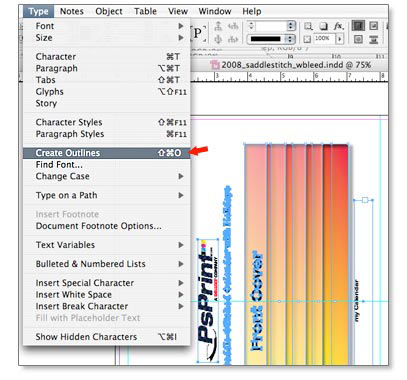
 Go to each page and Select All (Ctrl A - PC / Cmd A - Mac)Type > Create Outlines
 File > ExportSave file as Acrobat 1.3